
Quick Start
Run the demo agent, approve its first request, attest a click, and verify the manifest in the page and with eqty-notary-verify.
This page runs a toy web agent against the Browser Notary: it clicks a button, asks the notary to
attest the click, and verifies the result. You need the extension
installed, and a checkout of vcomp-notary-browser with npm install run.
1. Start the demo page
npm run demodemo on http://localhost:18765/Open http://localhost:18765/. localhost counts as a secure context, so the notary accepts it as
a caller; on any other host a page must be served over https://.
Open the browser console on the page and check the notary is there. Neither call needs consent:
window.eqtyNotary.info
// { name: "EQTY Browser Notary", protocol: 1, version: "0.0.1" }

await eqtyNotary.isReady()
// { status: "ready", state: "READY", anchored: true }
anchored: false means no desktop notary accepted the browser, and the chain will start at the
browser’s own self-issued root.
2. Run the agent and approve it
Tick screenshot and click Run agent. The agent dispatches a click on Buy now, then
calls attest. This is the page’s first call that uses its key, so the notary asks you:
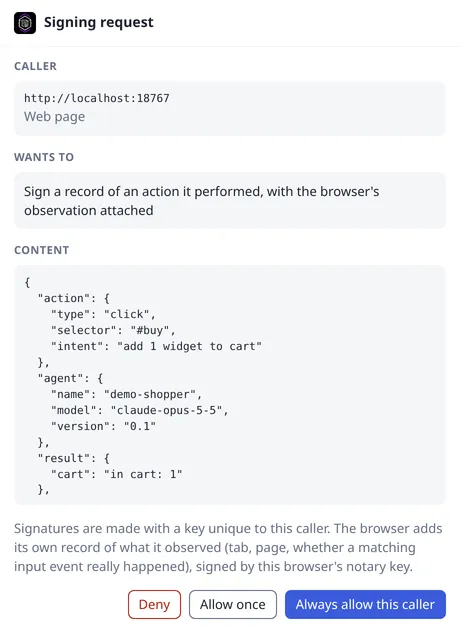
The prompt names the caller as the browser determined it, not as the page claims, says what it
asked for, and previews the content to be signed. Click Always allow this caller. Allow
once answers only this call; Deny rejects it with DENIED.
3. Read the result
The page shows the attested computation’s CID, the result of verifying the manifest in the page, and the browser’s observation:
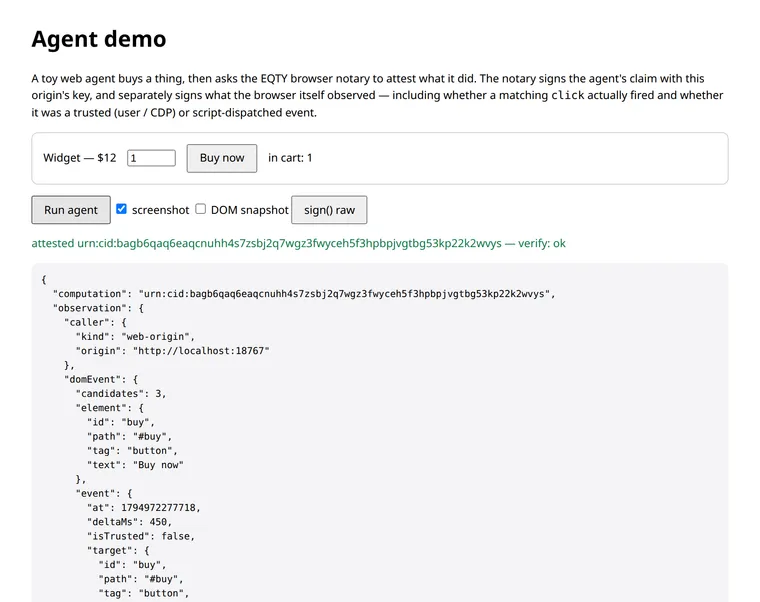
The fields that matter in the observation:
| Field | Here | Meaning |
|---|---|---|
caller.origin | http://localhost:18765 | Who asked, from the browser’s sender metadata |
domEvent.matched | true | A click on #buy really fired within the look-back window |
domEvent.event.isTrusted | false | A page script dispatched it, as the agent did. Click Buy now yourself and attest again to see true. |
screenshot.cid | urn:cid:… | The PNG of the tab, carried in the manifest’s blobs |
Below it, chain lists the credentials from the root down: VCompTpmV1 and VCompProcessV1 when
anchored, then VCompBrowserV1 and VCompBrowserOriginV1.
4. Verify outside the browser
Open the extension’s popup, then the Notary screen (the arrow next to Notary) and its history
icon. The attestation is listed under Activity; click Manifest to download it as
attestation-<id>.manifest.json. Then, on a machine with the
desktop notary’s tools:
eqty-notary-verify attestation-*.manifest.jsonThat checks every blob against its CID, every statement against its ID and every proof, and, when the chain is anchored, the TPM quote behind it. See Chain of Trust for how the root credential is checked on each platform.
5. Do it from your own page
The same in your own code:
document.querySelector("#buy").click();          // the agent acts…
const { manifest, computation } = await eqtyNotary.attest({
  action: { id: crypto.randomUUID(), type: "click", selector: "#buy", intent: "add 1 widget" },
  agent: { name: "shopper", model: "claude-opus-5-5" },
  result: { ok: true },
  evidence: { screenshot: true },
});
const report = await eqtyNotary.verify(manifest); // offline, no consent
Next: the Developer Guide covers detection, consent, signing, lineage statements, agent extensions and verification policy.