
Developer Guide
Detect the Browser Notary from a page, ask for consent, sign data, attest agent actions, register lineage statements, call it from an agent extension, and verify the results.
This guide is for web developers and agent builders. It covers detecting the notary, asking for
consent, signing, attesting actions, and verifying the results. Each site (origin: scheme, host
and port) that uses the notary gets its own P-256 key and a did:key; the key never leaves
the browser. The overview shows how that key chains to the
hardware.
Only secure contexts can use the notary: https:// pages, and http://localhost /
127.0.0.1 for development. Everything comes back as an EQTY manifest
({version: "3", contexts, statements, blobs}) carrying the whole chain, so anyone can verify it
offline. Method signatures and error codes are in the API reference.
Detecting the notary
The extension defines window.eqtyNotary in every page, iframes included,
before any of the page’s own scripts run. Detection needs no consent and
reveals no key.
The simple check
if (window.eqtyNotary) {
  // installed
}
Without a script-order assumption
For libraries that may load before or after the extension, or in environments where you cannot be sure, ask for an announcement:
function detectNotary(timeoutMs = 500) {
  if (window.eqtyNotary) return Promise.resolve(window.eqtyNotary);
  return new Promise((resolve) => {
    const timer = setTimeout(() => done(null), timeoutMs);
    const onAnnounce = (e) => done(e.detail.notary);
    function done(n) {
      clearTimeout(timer);
      window.removeEventListener("eqtyNotary#announce", onAnnounce);
      resolve(n);
    }
    window.addEventListener("eqtyNotary#announce", onAnnounce);
    window.dispatchEvent(new Event("eqtyNotary#request"));
  });
}
The notary answers every eqtyNotary#request with an eqtyNotary#announce
CustomEvent whose detail is { info, notary }. It also announces once on
load, and fires a plain eqtyNotary#initialized event.
From CSS or markup checks
document.documentElement.dataset.eqtyNotary // "1" (the protocol version) when presenthtml[data-eqty-notary] .needs-notary { display: block; }Is it usable, and how strong is it?
const d = await eqtyNotary.detect();
// { available: true, anchored: true, state: "READY",
// name: "EQTY Browser Notary", protocol: 1, version: "0.1.0" }| field | meaning |
|---|---|
available | the notary can sign right now |
anchored | the chain goes down to a TPM-backed desktop notary; false means the browser self-certifies |
state | READY, or PROVISIONING / FAILED while it can’t sign |
protocol | API version; this guide describes protocol 1 |
eqtyNotary.info gives {name, protocol, version} synchronously.
Consent
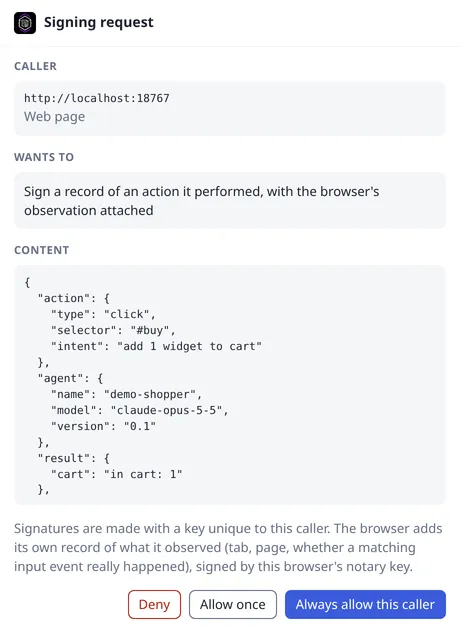
The first time your site uses anything that involves its key, the user sees a
prompt naming your origin and what you asked for (for attest and sign, a
preview of the content). They can Deny, Allow once or Always
allow. A denial rejects your call with code DENIED.
Methods that need no consent: detect, isReady, verify,
verifySignature.
Ask for consent when the user expects it, for example in response to a click, rather than on page load:
button.addEventListener("click", async () => {
  try {
    const { did } = await eqtyNotary.publicKey();   // triggers the prompt once
    showConnected(did);
  } catch (e) {
    if (e.code === "DENIED") showDeclined();
    else throw e;
  }
});
The user can also allow your site ahead of time with the popup’s Notary switch, which is the same standing grant as Always allow. They can revoke the grant (the switch, or Revoke in Notary settings), or delete your key altogether (Forget in Notary settings, or the trash icon on the Notary screen). After that, your site gets a new key and DID.
Signing data
All signatures are ECDSA P-256 over SHA-256 (ES256), returned as raw r||s
hex (64 bytes, low-s), made with your site’s key.
const t = await eqtyNotary.signText("I approve order #1234");
// { status: "ok", signature: "9f3c…", public_key: "02ab…", did: "did:key:zDn…", data: "4920617070…" }

const j = await eqtyNotary.signJSON({ order: 1234, total: "12.00" });
// signs the RFC 8785 (JCS) canonical form: key order does not matter

const b = await eqtyNotary.signBytes(new Uint8Array([1, 2, 3]));

// The low-level form, identical to the desktop notary's POST /v1/sign:
const r = await eqtyNotary.sign({ data: "68656c6c6f", hash: "SHA256", algo: "ECDSA" });
data in every reply is the exact bytes that were signed, in hex. Keep it
with the signature if a verifier will need it.
Limits: 2 MiB per signature, and a per-site rate limit (120 a minute by default).
To know whose key it is:
const dids = await eqtyNotary.getDids();
// { registeredBy: <your site's DID>, operatedBy: <same>, executedOn: <the browser's DID> }
const chain = await eqtyNotary.credential();   // manifest: the credential chain for your key
Attesting agent actions
attest is for agents acting in a page. You describe what you did; the
browser adds what it observed itself and signs that separately. A
verifier sees two things:
- your claim, signed by your site’s key, and
- the browser’s observation, signed by the browser’s key: the tab and
frame the request came from, the URL, and whether a DOM event matching your
claim really fired, including whether the browser marked it
isTrusted.
// 1. act
document.querySelector("#buy").click();

// 2. attest, straight after (the browser looks back 10 s for the matching event)
const out = await eqtyNotary.attest({
  action: { id: crypto.randomUUID(), type: "click", selector: "#buy", intent: "add 1 widget to cart" },
  agent:  { name: "shopper", model: "claude-opus-5-5", version: "1.2" },
  result: { cart: 1 },
  evidence: { screenshot: true },         // optional, see below
});
// { manifest, computation, action, observation }| field | |
|---|---|
action | required, any JSON object describing what you did. type and selector enable DOM matching. |
agent | optional self-description, recorded as the computation |
result | optional outcome you report |
inputs | optional urn:cid: references to things you consumed |
evidence.corroborate | default true: match the action to a DOM event |
evidence.windowMs | how far back to look for that event (default 10000) |
evidence.screenshot | add a PNG of the visible tab (only if the tab is visible) |
evidence.domSnapshot | add the serialized DOM (up to 5 MB) |
Action types the browser can match: click, dblclick, rightclick,
type / fill / input, select, check, submit, press / keypress.
For other types (navigate, scroll, API calls) the claim is still signed,
just not matched to a DOM event.
The observation, as the browser records it:
{
  "type": "VCompBrowserObservationV1",
  "caller": { "kind": "web-origin", "origin": "https://shop.example" },
  "tab":    { "url": "https://shop.example/cart", "title": "Cart", "active": true, "incognito": false },
  "frame":  { "frameId": 0, "topLevel": true, "url": "https://shop.example/cart" },
  "domEvent": {
    "matched": true,
    "selectorResolved": true,
    "event": { "type": "click", "isTrusted": false, "deltaMs": 41,
               "target": { "tag": "button", "id": "buy", "text": "Buy now", "path": "#buy" } },
    "page": { "url": "https://shop.example/cart", "visibility": "visible", "hasFocus": true }
  },
  "screenshot": { "cid": "urn:cid:bafkr4i…", "mediaType": "image/png", "bytes": 48213 }
}
How to read domEvent:
matched: true, isTrusted: false | the click happened, dispatched by a page script (an in-page agent) |
matched: true, isTrusted: true | the click happened as real input: a person, or automation driving the browser (CDP / WebDriver). These two cannot be told apart. |
matched: false | no such event was seen in the window: the claim is uncorroborated |
Form values are never recorded, only their SHA-256 and length; password fields not at all.
Give each action a unique id. Statements are content-addressed and
timestamped to the second, so two identical actions in the same second would
otherwise share one ID.
With the SDK
sdk/index.ts in vcomp-notary-browser wraps this: notarize performs the action,
then attests it with the outcome (or the error), adding an id.
import { detectNotary, notarize } from "./sdk/index.ts";

if (await detectNotary()) {
  const { computation, manifest } = await notarize(
    { type: "click", selector: "#buy" },
    () => document.querySelector<HTMLButtonElement>("#buy")!.click(),
    { agent: { name: "shopper" }, evidence: { screenshot: true } },
  );
}
Lineage statements
To record your own lineage graph (what data you used, what you produced), register EQTY statements signed by your key:
const { statement, manifest } = await eqtyNotary.registerStatement({
  type: "ComputationRegistration",
  body: { input: ["urn:cid:bafkr4i…"], output: "urn:cid:bafkr4i…" },
});
type | body fields |
|---|---|
DataRegistration | data (CID or CIDs) |
ComputationRegistration | input, output (CID or CIDs), computation? (CID), executedOn? (DID; defaults to the browser) |
MetadataRegistration | subject, metadata (CIDs) |
StorageRegistration | data (CIDs), storedOn (DID) |
GovernanceRegistration | subject, document (CIDs) |
registeredBy (and operatedBy) is always your key; you cannot set it.
Unknown fields are rejected, because a field the schema doesn’t define would
fall outside the signature.
From an agent extension
An agent that is itself a browser extension calls the notary by message
instead of through window. Its key is scoped to its extension ID.
const NOTARY = "browser-notary@eqtylab.io";   // Firefox; in Chrome, the notary's extension ID

async function notary(method, params) {
  const r = await chrome.runtime.sendMessage(NOTARY, { method, params });
  if (r?.error) throw Object.assign(new Error(r.error.message), { code: r.error.code });
  return r.result;
}

// detect: no reply (or an error) means it is not installed
const ready = await notary("isReady").catch(() => null);

// attest something done in a tab the agent controls: the notary observes that tab
await notary("attest", {
  action: { id: crypto.randomUUID(), type: "click", selector: "#buy" },
  evidence: { tabId, screenshot: true },
});
extensionNotary(id) in the SDK provides the same interface as
window.eqtyNotary.
Verifying
In the page
const report = await eqtyNotary.verify(out.manifest);
// { ok: true, statements: [...], badBlobs: [], bindings: [...] }

const { valid } = await eqtyNotary.verifySignature({ did: t.did, signature: t.signature, text: "I approve order #1234" });
verify checks that every blob matches its CID, every statement matches its
ID, every credential’s proof verifies, and every statement is registered by
its signer. bindings lists the identity credentials in the chain, roots
first.
On a server, or anywhere else
The manifest is standard EQTY. Verify it with:
eqty-notary-verify <manifest.json>from the Desktop Notary. This also checks the TPM quote, PCRs and binding.- the EQTY
integritySDK (verify_vc, statement CID recomputation). - a raw signature from
sign*: ES256 over SHA-256 ofdata, against the public key indid:key(multicodec0x1200, compressed P-256).
verify checks signatures and structure. Whether you trust the result is
a separate decision. A typical policy:
- The site. The
VCompBrowserOriginV1credential’scaller.originis the origin you expect, and its subject is the key that signed the claim. - The browser. That credential’s issuer is the key a
VCompProcessV1credential certifies, and theexecutablePath/binaryCidthere is a browser you accept. - The machine. That credential’s issuer is a notary whose
VCompTpmV1quote verifies, with PCRs and EK chain you accept. - The action. The observation’s
domEvent.matched(andisTrusted, as your policy requires) supports the claim.
Good practice
- Detect, then degrade. Treat the notary as optional unless your use case
needs it; check
detect().anchoredif you need hardware backing. - Ask in context. Trigger the first keyed call from a user action, so the prompt makes sense.
- Attest right after acting, inside the
windowMswindow, with aselectorthat resolves to the element you acted on. - Unique
idper action. - Keep the manifest. It is the evidence: store it alongside whatever the action produced.
- Don’t put secrets in actions or results. They go into the manifest’s blobs in clear and are shown in the consent preview.
- Every script on your origin shares your key. Third-party scripts you include can call the notary as you, just as they can read your cookies.